PowerCLI – Reboot VCSA through appliance rest API.

This one might be an easy one. When you are getting started with learning something maybe an easy one is the best way to start.

So lets look at the API. https://vmware.github.io/vsphere-automation-sdk-rest/vsphere/index.html
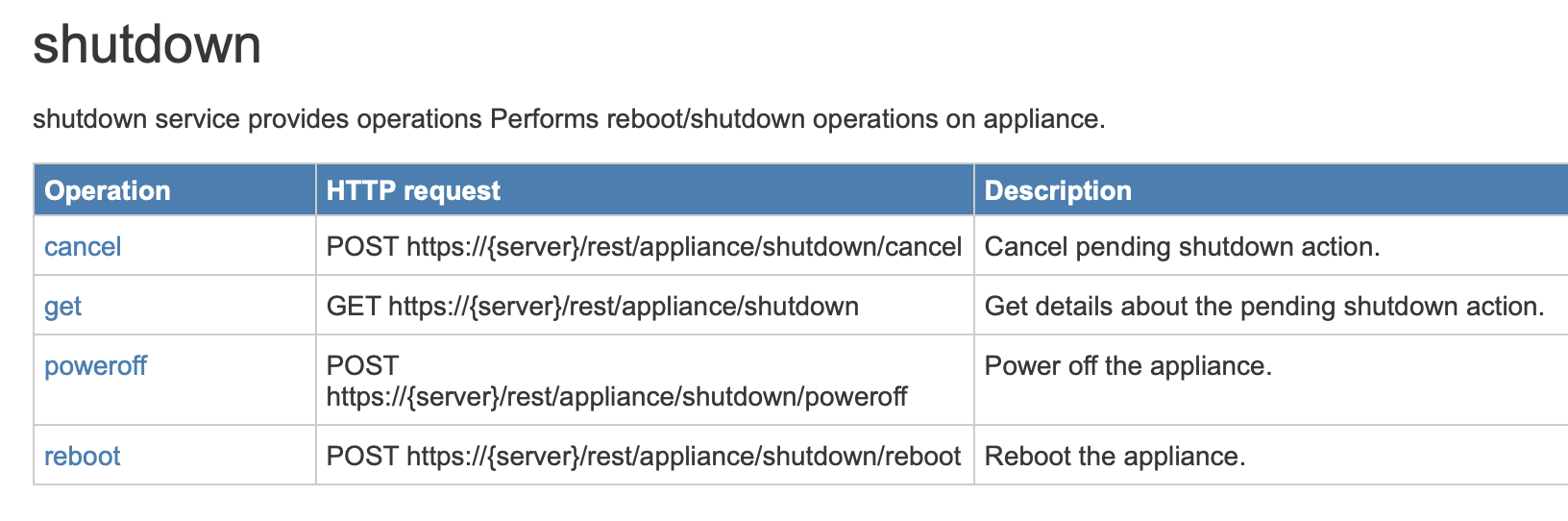
I am not sure how /rest/appliance/shutdown translates into com.vmware.appliance.shutdown but it does. Maybe it is just something you have to remember or lookup on txusa.cloud 🙂 In the following weeks I will post one on accounts and there it is even weirder, because /appliance/local-account somehow translates to com.vmware.appliance.local_accounts. Let’s look at reboot first. So when we click on reboot we see that two parameters are needed. reason of type string and delay of type long and there are no response values.
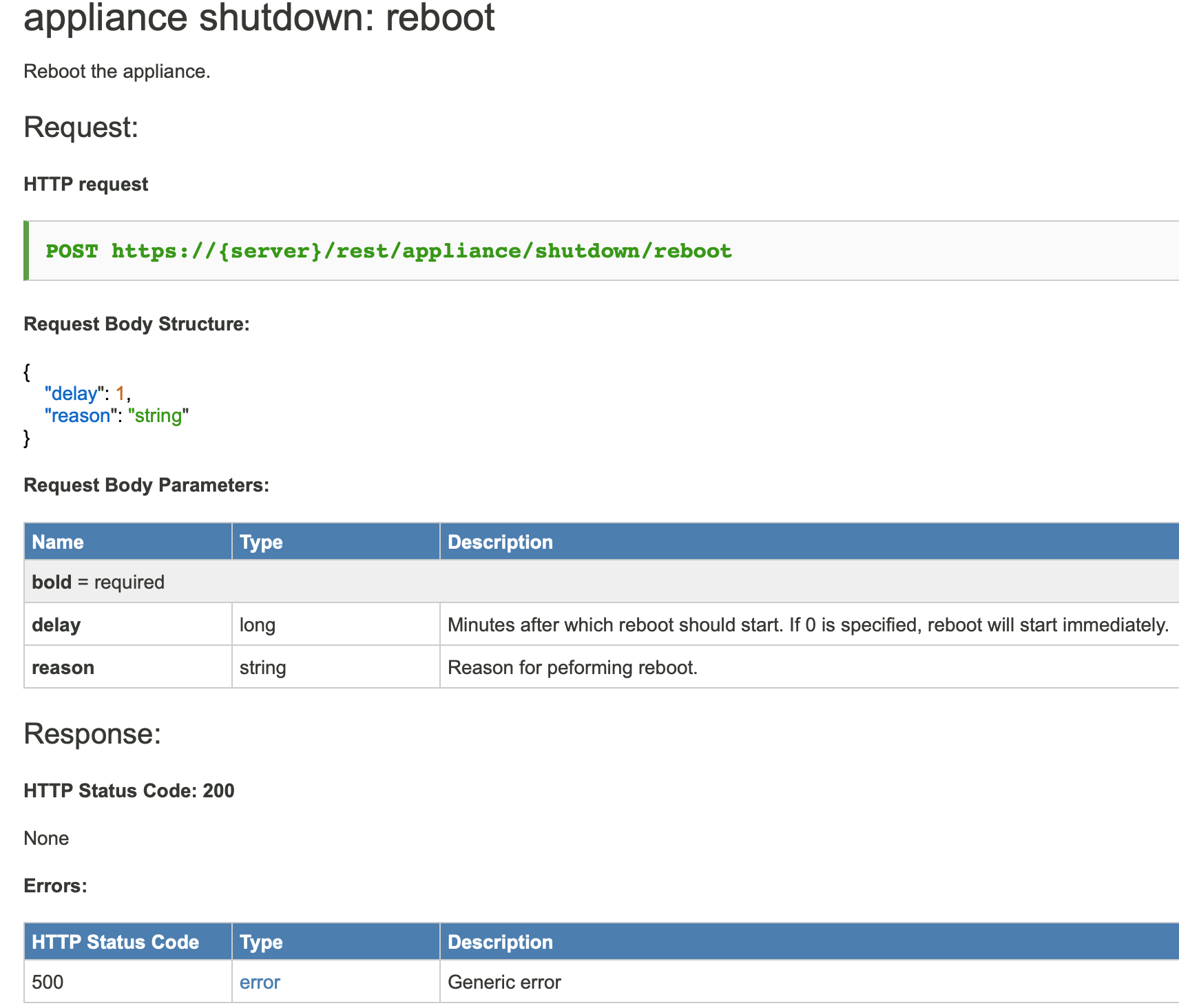
So to reboot our code would look like this. Parameters: 5 minute delay and reason “A reboot just for the fun of it.”

[code language="powershell"]
## Connect to our VCSA first.
$cisConnection = Connect-CisServer -server vcenter.txusa.cloud

## Get the object
$shutdownAPI = Get-CisService -Name "com.vmware.appliance.shutdown"

## And execute the method to reboot.
$shutdownAPI.reboot(5,"A reboot just for the fun of it.")
[/code]

If you look at the API for poweroff it takes the same two parameters. So our code would look like this for power off.

[code language="powershell"]
## Connect to our VCSA first.
$cisConnection = Connect-CisServer -server vcenter.txusa.cloud

## Get the object
$shutdownAPI = Get-CisService -Name "com.vmware.appliance.shutdown"

## And execute the method to power off.
$shutdownAPI.poweroff(5,"Let's call it a day.")
[/code]

If we look at get. Which will give us the state of a pending request we don’t have any parameters but we have response values.
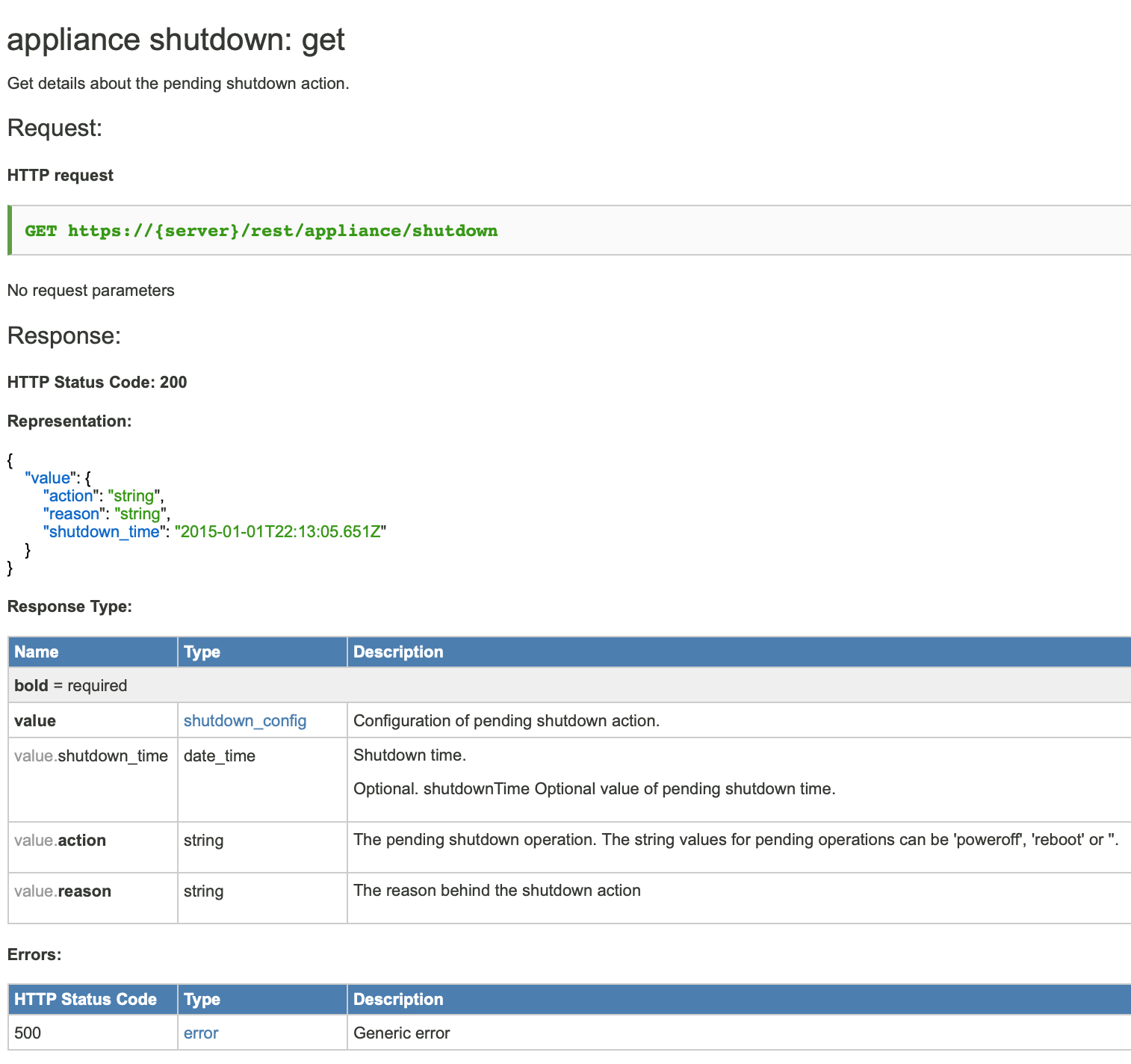
So our code would look like this.

[code language="powershell"]
## Connect to our VCSA first.
$cisConnection = Connect-CisServer -server vcenter.txusa.cloud

## Get the object
$shutdownAPI = Get-CisService -Name "com.vmware.appliance.shutdown"

## And execute the method to get the pending state information.
$shutdownAPI.get()
[/code]

And last but not least we have the code for cancel which has no parameters and no response. So I guess it will cancel whatever pending request there is.

[code language="powershell"]
## Connect to our VCSA first.
$cisConnection = Connect-CisServer -server vcenter.txusa.cloud

## Get the object
$shutdownAPI = Get-CisService -Name "com.vmware.appliance.shutdown"

## And execute the method to cancel.
$shutdownAPI.cancel()
[/code]

vRO – get wwpn from HBAs

This weeks vRealize Orchestrator snippet will show how to get the wwpn from the HBAs of each hosts in the cluster. Input parameter is a cluster object (VcClusterComputeResource), here named cluster.

//input parameter is cluster of type VcClusterComputeResource
//First we will get an array of all hosts in the cluster
var hosts = cluster.host;

//Lets do this for each host
for each (var host in hosts)
{
	
  //This will give us an array of all HBAs of the host
  var hbas = host.configManager.storageSystem.storageDeviceInfo.hostBusAdapter;
  
  //Lets do this for each HBA of the host.
  for each(var hba in hbas)
  {
    //We are only interested in Fibre Channel HBAs so only do this if HBA is of type VcHostFibreChannelHba.
    if (hba instanceof VcHostFibreChannelHba)
    {
      //This will give us the WWPN
      var wwpn = hba.portWorldWideNameHex;

      //Lets get the device (example vmhba1)
      var device = hba.device;

      //Output will be like: Hostname: myesx.txusa.cloud   Device: vmhba1   wwpn: 21:00:00:26:b6:02:c1:01
      System.log("Hostname: " + host.name + "   Device: " + device + "   wwpn: " + wwpn);
    }
  }	
}

System Requirements for VMware products

Most system (hardware) requirements on a single page. I hope it will be useful to you. I also have added the links to the source.

vSphere vCenter and Platform Services Controller appliances (VCSA)

https://docs.vmware.com/en/VMware-vSphere/6.7/com.vmware.vcenter.install.doc/GUID-457EAE1F-B08A-4E64-8506-8A3FA84A0446.html

ProductSizevCPUvRAMStorageComment
vCenter VCSAtiny210 GB250 GB10 hosts and 100 VMs
default storage
vCenter VCSAtiny-lstorage210 GB775 GB10 hosts and 100 VMs
large storage
vCenter VCSAtiny-xlstorage210 GB 1650 GB10 hosts and 100 VMs
x-large storage
 
vCenter VCSAsmall416 GB290 GB100 hosts and 1,000 VMs
default storage
vCenter VCSAsmall-lstorage416 GB820 GB100 hosts and 1,000 VMs
large storage
vCenter VCSAsmall-xlstrorage416 GB1700 GB100 hosts and 1,000 VMs
x-large storage
 
vCenter VCSAmedium824 GB425 GB400 hosts and 4,000 VMs
default storage
vCenter VCSAmedium-storage824 GB925400 hosts and 4,000 VMs
large storage
vCenter VCSAmedium-xlstorage824 GB1805 GB400 hosts and 4,000 VMs
large storage
 
vCenter VCSAlarge1632 GB640 GB1,000 hosts and 10,000 VMs
default storage
vCenter VCSAlarge-lstorage1632 GB990 GB1,000 hosts and 10,000 VMs
large storage
vCenter VCSAlarge-xlstorage1632 GB1870 GB1,000 hosts and 10,000 VMs
x-large storage
 
vCenter VCSAxlarge2448 GB980 GB2,000 hosts and 35,000 VMs
default storage
vCenter VCSAxlarge-lstorage2448 GB1030 GB2,000 hosts and 35,000 VMs
large storage
vCenter VCSAlarge-xlstorage2448 GB1910 GB2,000 hosts and 35,000 VMs
x-large storage
 
PSC VCSAinfrastructure24 GB60 GBPlatform Services Controller appliance

NSX Data Center for vSphere, 6.4

https://docs.vmware.com/en/VMware-NSX-Data-Center-for-vSphere/6.4/com.vmware.nsx.install.doc/GUID-311BBB9F-32CC-4633-9F91-26A39296381A.html

ProductSizevCPUvRAMStorage
NSX Managerregular416 GB60 GB
NSX Managerlarge824 GB60 GB
 
NSX ControllerCompact1512 MB1 x 584 MB
1 x 512 MB
NSX ControllerLarge21GB1 x 584 MB
1 x 512 MB
NSX ControllerQuad-Large42 GB
1 x 584 MB
1 x 512 MB
NSX ControllerX-Large68 GB1 x 584 MB
1 x 2 GB
1 x 256 MB
 
Guest IntrospectionN/A22 GB5 GB (Provisioned space is 6.26 GB)

NSX-T Data Center, 2.4

https://docs.vmware.com/en/VMware-NSX-T-Data-Center/2.4/installation/GUID-14183A62-8E8D-43CC-92E0-E8D72E198D5A.html

ProductSizevCPUvRAMStorageComment
NSX ManagerExtra Small28 GB200 GBCloud Service Manager Only
NSX ManagerSmall416 GB200 GBFor Lab or PoC
NSX ManagerMedium624 GB200 GB
NSX ManagerLarge1248 GB200 GB
 
NSX Edge VMSmall24 GB200 GBFor Lab or PoC
NSX Edge VMMedium48 GB200 GBUp to 64 Hypervisor
NSX Edge VMLarge816 GB200 GBMore than 64 Hypervisor

vRealize Operations Manager 7.0

https://kb.vmware.com/s/article/57903

For storage requirements please see Sizing Guideline Spreadsheet attached to above link.

ProductSizevCPUvRAM
vRealize Operations NodeExtra Small28 GB
vRealize Operations NodeSmall416 GB
vRealize Operations NodeMedium832 GB
vRealize Operations NodeLarge1648 GB
vRealize Operations NodeExtra Large24128 GB
 
Remote Collector (RC)Standard24 GB
Remote Collector (RC)Large416 GB

vRealize Log Insight 4.7

https://docs.vmware.com/en/vRealize-Log-Insight/4.7/com.vmware.log-insight.getting-started.doc/GUID-F73595DC-1511-4A19-9AE4-02C8FEDF5CF5.html

https://kb.vmware.com/s/article/60355

For storage requirements please see Sizing Calculate attached to above link.

ProductSizevCPUvRAMComment
vRealize Log InsightExtra Small24Log ingest Rate: 6 GB/day
Events per Second: 400
vRealize Log InsightSmall48Log ingest Rate: 30 GB/day
Events per Second: 2000
vRealize Log InsightMedium816Log ingest Rate: 75 GB/day
Events per Second: 5000
vRealize Log InsightLarge1632Log ingest Rate: 225 GB/day
Events per Second: 15000

vRealize Orchestrator 7.5

https://docs.vmware.com/en/vRealize-Orchestrator/7.5/com.vmware.vrealize.orchestrator-install-config.doc/GUID-EFC070D9-B758-4488-B07B-91341F43E0C2.html

ProductvCPUvRAMStorage
vRealize Orchestrator26 GB17 GB

vRealize Suite Lifecycle Manager 2.0

https://docs.vmware.com/en/VMware-vRealize-Suite-Lifecycle-Manager/2018/com.vmware.vrsuite.lcm.20.doc/GUID-604B1E81-FBBA-4884-A13B-B97D5EF9FDA9.html

ProductvCPUvRAMStorageComment
Lifecycle Manager216 GB127 GBIf content lifecycle management is disabled
Lifecycle Manager416 GB127 GBIf content lifecycle management is enabled

vRealize Automation 7.5

https://docs.vmware.com/en/vRealize-Automation/7.5/com.vmware.vra.install.upgrade.doc/GUID-7AE96C90-4D7F-41B0-8235-8CA8D962259F.html

ProductvCPUvRAMStorageComment
vRealize AutomationAppliance418 GB140 GB
Infrastructure Core Server48 GB40 GB
Infrastructure Web Server28 GB40 GB
Infrastructure Manager Server28 GB40 GB4 vCPU if performing more than
100 concurrent provisions
Infrastructure Web/Manager Server28 GB40 GB
Infrastructure DEM Server28 GB40 GB4 vCPU if performing more than
100 concurrent provisions
Infrastructure Agent Server28 GB40 GB
MSSQL Database Server28 GB40 GBRecommended:CPU: 8 vCPU,
RAM: 16 GB, Disk: 80 GB
vRealize Business for Cloud Appliance24 GB50 GB

PowerCLI – Configure VCSA update policy

It took me a little while to figure this one out, since I am new to this rest API thing and I find the old API documentation easier. On VMware’s homepage I was not able to find the API for vSphere 6.7, only 6.5.

https://code.vmware.com/apis/60/vcenter-server-appliance-management

However you can access the API explorer directly on the vCenter as described here.

https://blogs.vmware.com/developer/2017/01/getting-started-vsphere-api-explorer.html

Below you can find my little PowerCli code snippet.

## Connect to VCSA. You would think to use the root user but no, SSO user
# like administrator@vsphere.local.
$cisConnection = Connect-CisServer -server vcenter.txusa.cloud 

## I didn't know how to create an updateSpec object so I just
## got the existing one from VCSA and then will overwrite the parameters
$updateSpec = (Get-CisService -Name "com.vmware.appliance.update.policy").get()


## Set parameters for update policy
$updateSpec.auto_stage = $true
$updateSpec.auto_update = $false
$updateSpec.manual_control = $true 
$updateSpec.username = ''
## vSphere 6.7u1 now forces https
$updateSpec.custom_URL = "https://updaterepository.txusa.cloud/vcsa"
    
## Time and day when to check for new updates. In this case every day at 5:00 am
$schedule = [pscustomobject] @{day="EVERYDAY";hour=5;minute=0}
$updateSpec.check_schedule = @($schedule)
    
## Set new update policy
(Get-CisService -Name "com.vmware.appliance.update.policy").set($updateSpec)

## Disconnect from VCSA
Disconnect-CisServer vcenter.txusa.cloud -Confirm:$false

IBM SAN Solution Design Best Practices for VMware vSphere ESXi

My Redbook got published!

redbook


No, not that redbook!


My IBM SAN Solution Design Best Practices for VMware vSphere ESXi Redbook got published. You can download it for free, the same as all IBM Redbooks. You can also buy it for instance from amazon. I don’t know why you would but you could.

I did not write it all by myself, I had company writing in it. My co-authors were:

  • Richard Kelley
  • Scheila Rossana Rinaldo Maliska
  • Leandro Torolho
  • Jon Tate

The title of the Redbook speaks for itself. It has a focus on IBM b-type (Brocade) SAN switches and SVC, Storwize V7000 and Storwize V3700 Storage Systems. I would say most of it also applies to units from other vendors as well.

If you enjoy my Redbook then please take the time to rate it.

Nutanix explained by Josh Odgers

My Australian buddy Josh Odgers – VCDX 90# explains Nuntanix. He likes to rub in my face that he has a lower VCDX number than me but remember we defended the same week in Toronto.

Josh does a really great job explaining Nutanix, even I can understand. Great job!

Take the time and watch this little seven minute video if you are interested in storage and haven’t heard about Nutanix.

VMworld 2013 Session Videos

As I mentioned before this year I am not attending VMworld 2013. I am however still following what is going on. I was very excited to see that VMware has published a few sessions on youtube. I assume they will continue to do so as VMworld continues. For me it would have been great if they would have published it as apple podcasts since it would have allowed me to download it and watch it on the go. Still youtube is much better from what they have done in the past where you needed a pass to get access. As I remember there were even special passes just for online access. I am not sure if they have done the same thing last year as I was attending VMworld I wasn’t paying much attention to it. VMworld is growing and growing. Supposedly there are 22500 attendees this year which allegedly makes it the largest IT conference in the world. Moscone Center might hit its limit at some point so maybe in the future we will see that it gets booked out so it is even more valuable that the sessions will come publicly available right after. Thanks VMware!

Well here are the links. I don’t find it very organized but that might be due to youtube itself. The sessions are not necessarily under 2013 Sessions. I just go to videos at the moment. If you have the session numbers you can probable search for those.

http://www.youtube.com/user/VMworldTV/home

http://www.youtube.com/user/VMworldTV/videos

Here are some direct links

VMworld 2013: Session VSVC4944 – PowerCLI Best Practices: A Deep Dive

VMworld2013: Session PHC5605-S – Everything You Want to Know About vCloud Hybrid Service

VMworld 2013: Session BCO5129 – Protection for All: vSphere Replication & SRM Technical Update

VMworld 2013: Session NET5847- NSX: Introducing the World to VMware NSX

VMworld 2013: Session SEC5893 – Changing the Economics of Firewall Services

VMworld 2013: Session VCM7369-S – Uncovering the Hidden Truth in Log Data

What will bring vCO 5.5?

Well this year I did not have the chance to go to VMworld SF, or lets say can’t afford to go every year. So the things I found are from the Web and not from VMworld and don’t have to be true. I will list a few things I found very shortly and I will comment them.

Simplified configuration
vCO 5.5 should by default use SSO and an embedded database, so as I understand you should be able to power it up and be ready to go. Of course in a production environment you should use an external database so my guess, for a production environment you still need to do some tuning.

High Availability
Supposedly you should be able to install vCO 5.5 in cluster mode. Active-Active or Active-Passive. An external database is needed for this. Well where I use it, there isn’t really a need for HA but I can picture that there are shops that need this.

Resume failed workflows
If a workflow failed you should be able to pick up the workflow and resume it. You can change the parameters before doing so. I cannot really picture this yet but sounds interesting.

New UI
It seems there were some complains about the new UI. I actually didn’t mind. I found the “for each” loop a little difficult to use but in general I thought it was an improvement over the old one. Seems they have changed it again and I am interested to see the changes.

Forward/Backward navigation through API browser.
This I find really exciting. Now you should be able to go back and forward in the API Browser. Before I clicked my self through the API and then needed to go back but couldn’t. You would need to search for your object again and start over from there. I have asked for this improvement last year when I was at VMworld and it seems I was not the only one. Very helpful, saves a lot of time. Actually I have also asked for the possibility to copy and paste from the API browser to the scripting pane. We’ll see if this will be possible as well. Really great news in my eyes.

That’s all for now on vCO 5.5 from my side. Waiting to get my hands on it in my new personal test lab once it is out.

vCO – Configure vMotion with Virtual Distributed Virtual Switch

Here is some code how to configure the vMotion address with a distributed virtual switch. Input parameter are my host and dvSwitch. I go through all portgroups and compare if it is called vmotion. If so I set IP and subnet. Hard coded so it is easier to understand, you probably want this also as input parameter or use some algorithm. For instance user last octet from MGT IP to have same last octet.

//myhost is input parameter of type VcHostSystem
//dvSwitch is input parameter of type...
 
var networkSystem = myhost.configManager.networkSystem;
var vMotionSystem = myhost.configManager.vmotionSystem;
var pgs = dvSwitch.portgroup;

for each (var pg in pgs)
{
	if (pg.name.toLowerCase() == "vmotion")
	{
		System.log("vMotion PG name: " + pg.name);
		var nic = new VcHostVirtualNicSpec();
		nic.ip = new VcHostIpConfig();
		nic.ip.dhcp = false;
		nic.ip.ipAddress = "192.168.1.10"; 
		nic.ip.subnetMask = "255.255.255.0";
		nic.distributedVirtualPort = new VcDistributedVirtualSwitchPortConnection();
		nic.distributedVirtualPort.switchUuid = dvSwitch.uuid;
		nic.distributedVirtualPort.portgroupKey = pg.key;

		networkSystem.addVirtualNic("", nic);  // HostNetworkSystem
		vMotionSystem.selectVnic("vmk1");  //enable vMotion
	}
	
}

vCO – Configure ESXi Syslog Server and more

In this example I configure some advanced setting on an ESXi host. Syslog server is just one of the.
First I create a for loop to create my hostSetting array objects. Then late I fill them. Always the key and a value. You can check the ESXi host advanced setting in GUI for parameters. You need to watch the type. For instance the port for the syslog server is of type value_IntValue. There are also float and long. I have to say I don’t know why it say deprecated for value. Maybe I have to come back on that.

http://www.vmware.com/support/orchestrator/doc/vco_vsphere41_api/index.html

//myhost is input parameter of type VcHostSystem
var hostSetting = new Array();

for (i=0; i<=3; i++)
{
	hostSetting[i] = new VcOptionValue();
}
hostSetting[0].key = "Syslog.Remote.Hostname";
hostSetting[0].value = "mysyslog.bigbluemike.com";

hostSetting[1].key = "Syslog.Remote.Port";
hostSetting[1].value_IntValue = 514;

hostSetting[2].key = "Config.Defaults.security.host.ruissl";
hostSetting[2].value = true;

hostSetting[3].key = "Annotations.WelcomeMessage";
hostSetting[3].value = "Welcome to this nice an shiny ESXi host.";

host.configManager.advancedOption.updateOptions(hostSetting);